
May 5, 2026 •Lydia Prazak
Over the past year, we’ve shareda full series of blogs—and even a webinar—focused on helping you understand how to build a strong sponsorship program for your chapter.
We’ve covered:
- Why sponsorships matter
- What to include in a sponsorship package
- How to price your packages
- How to reach out to sponsors with confidence
- And how to retain sponsors year after year
But now comes the part many of you have been waiting for:
How do you actually create a sponsorship packet that looks professional and is ready to send?
That’s exactly why we created this.
We now have a ready-to-use Canva sponsorship template designed specifically for AMPP chapters—so you can take everything you’ve learned and turn it into a polished, professional document in minutes.
What This Template Does for You
This template is designed to remove the guesswork and give you a plug-and-play starting point.
Instead of staring at a blank page, you now have:
- A structured sponsorship packet layout
- Pre-written sections to guide your content
- Built-in sponsorship level examples
- Two different formats for presenting your sponsorship options
All you need to do is customize it for your chapter and your event.
What's Included in the Template
The template walks you through everything you need in a sponsorship packet:
📄 Cover Page
- Event name
- Date and location
- “Sponsorship Opportunities” header
- Chapter Logo
📄 Event Overview
- What the event is
- Who should attend
- Why it matters
📄 Chapter + Audience Overview
- Who your chapter serves
- Industries represented
- Why your audience is valuable to sponsors
📄 Sponsorship Levels (Two Options to Choose From)
This is one of the most important parts of the template—and we’ve given you two ways to present your sponsorships:
✔ Option A: Chart Format
- Clean, side-by-side comparison
- Shows increasing value across Gold, Silver, Bronze
- Uses checkmarks to highlight what each level includes
Best for: quick scanning and clear comparisons
✔ Option B: List Format
- Each level is broken out into its own section
- Includes bullet points describing benefits
- Reads more like a “menu” of options
Best for: flexibility and simpler events
- Important: You only need one of these.
- Delete the version you’re not using to keep your packet clean and focused.
📄 Add-On Sponsorship Opportunities
- Coffee sponsor
- Lunch sponsor
- Lanyards
- Raffle prizes
- Student support
These smaller options make it easier for sponsors to say yes—especially local companies.
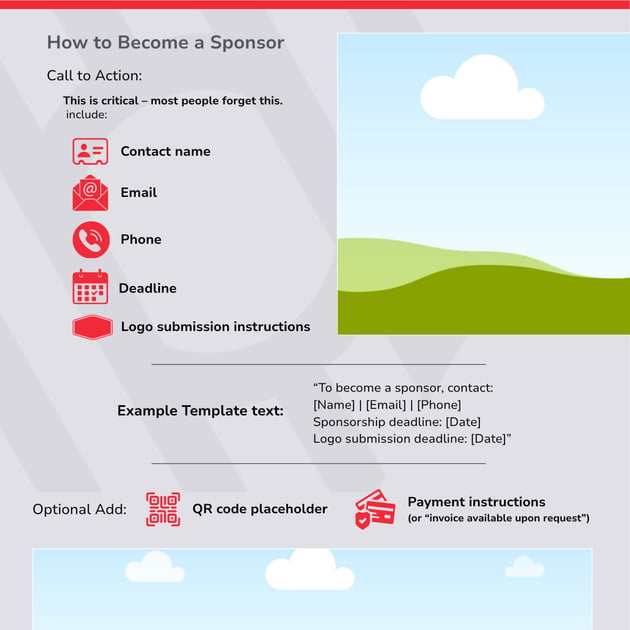
📄 Call to Action (How to Become a Sponsor)
- Contact information
- Sponsorship deadline
- Next steps
This is what turns your packet into action—don’t skip it.
How to Customize the Template (Step-by-Step)
You don’t need design or marketing experience to make this work. Just follow these steps:
1. Open the Canva Template here or from the Chapter Leader Resources Page
-
Click the link, click View Template and select “Open in Editor” to create your own copy.
-
If Canva is new to you or you’re not completely comfortable using it, we’ve also created a short webinar that walks through the basics—that teaches you how to edit text, update images, and export your designs.
-
2. Replace the Placeholder Text and update logo for your chapter
-
Every section includes example text to guide you.
-
Update:
- Event details
- Chapter description
- Audience information
- Chapter Logo (Use logo with transparent background for best results)
If you’re unsure what to write, keep it simple and direct.
3. Adjust Your Sponsorship Levels
-
Update:
- Pricing
- Benefits
- Anything that doesn’t apply to your event
Start simple—you can always refine later.
4. Choose Your Sponsorship Layout
- Decide between Chart (Option A) or List (Option B)
- Delete the version you’re not using
5. Remove Anything You Don’t Need
-
Not every event needs every section.
-
If something doesn’t apply—delete it.
-
This keeps your packet clean and professional.
6. Export and Share
-
Download your final version as a PDF and:
- Attach it to sponsor outreach emails
- Share it with your board and in your marketing efforts
- Use it in sponsor conversations
Simple Tips for Success
✔ Keep it clear and easy to scan
✔ Use realistic pricing
✔ Focus on your audience value
✔ Don’t overcomplicate your tiers
✔ Remember: done is better than perfect
How to use This in Real Life
Once your sponsorship packet is ready, it becomes your go-to tool:
- Send it when reaching out to sponsors
- Share it at chapter meetings
- Use it to guide conversations with potential partners
It gives you structure, confidence, and consistency.
This is Where It All Comes Together
You’ve learned the strategy.
Now you have the tool.
This template is what helps you turn ideas into action—and start building real sponsorship support for your chapter.
Start with one event.
Start with one sponsor.
And build from there.
Have question or need help getting started? Reach out to chapters@ampp.org. We are here to help!
Want more marketing tips? Subscribe to the "Lead & Succeed" blog to get the latest insights and tools for chapter leaders.
We're here to help you grow and strengthen your chapter. If there's a topic you'd like us to cover, let us know—we’re always looking for ways to support you better!
.gif?width=1200&height=200&name=Copy%20of%20Cross%20Promo%20Banners%20and%20Thin%20Email%20Headers%20(3).gif)